
Record videos
Hit record in your camera or social app and it captures your chosen clip, with your real microphone still recording sound.
REC / VIRTUAL CAMERA FOR ROOTED ANDROID
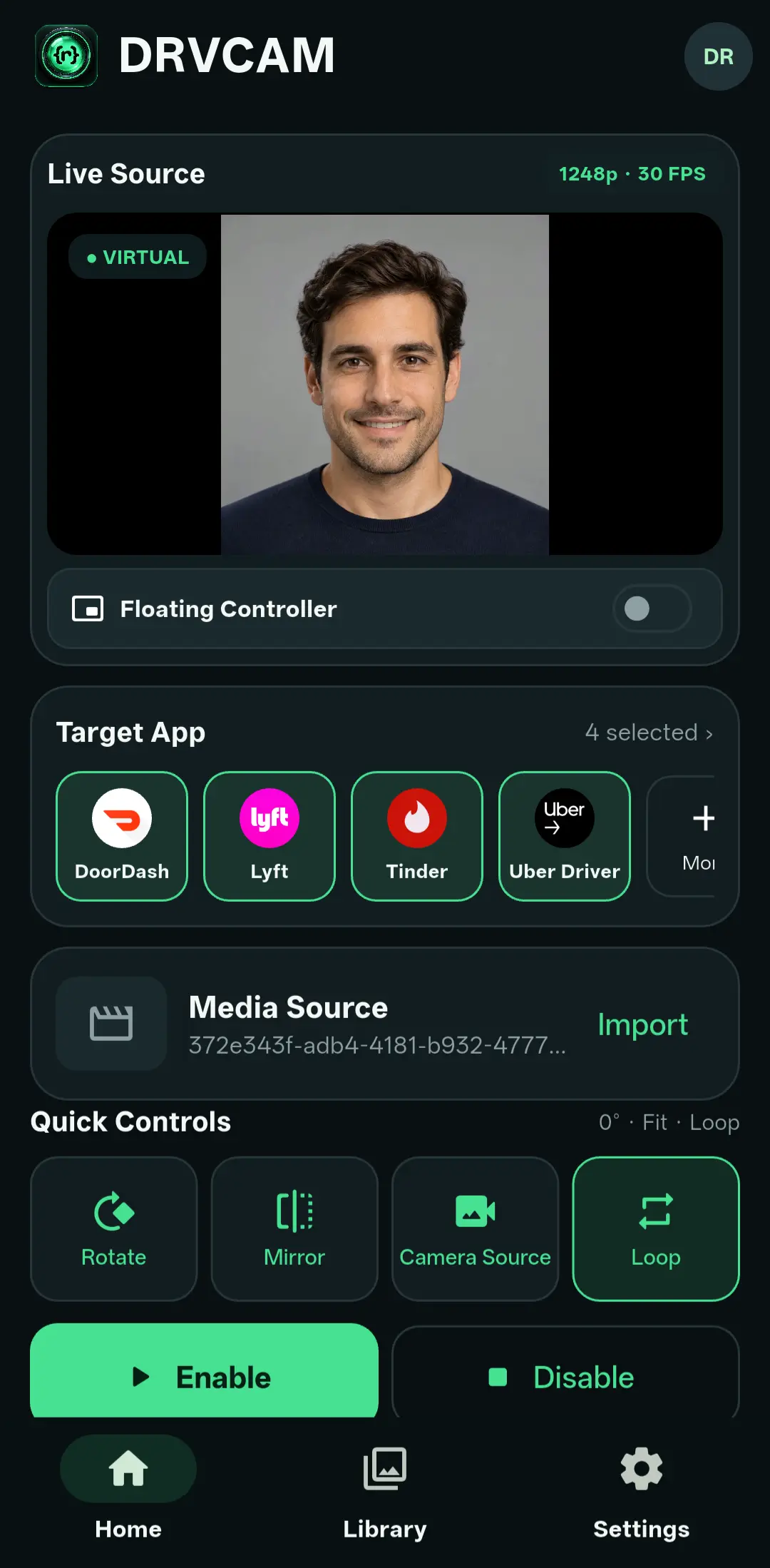
DRVCAM sends your own video or photo through the camera of the apps you choose. Record with it, go live with it, snap photos with it, and steer it in real time with presets, framing and a floating controller.
// USE CASES
Whatever the app does with its camera, DRVCAM decides what that camera sees.
Hit record in your camera or social app and it captures your chosen clip, with your real microphone still recording sound.
Stream a prepared video, a looping scene or a still, then cut between presets while you are live.
Photo-mode sessions capture your selected image, framed to 4:3, 16:9, 9:16 or 1:1.
Show a prepared clip or image in a call, and flip back to the real camera without hanging up.
Run a product demo or a walkthrough from media you prepared, with speed, loop and seek under your thumb.
Feed the same repeatable input into a camera app on every run and compare what it really saved.
// HOW IT WORKS
Add videos or photos to your private DRVCAM library.
Tap Use to put a source on Main, or save it to a preset.
Pick the apps that should receive the feed, then Enable.
Open the app's camera and steer everything from the floating controller.
// FEATURES
A bubble that stays above the app you are using. Play, pause, seek, restart, pan, zoom, change speed, load a preset, rotate, mirror or switch to the physical camera, all without leaving the app.
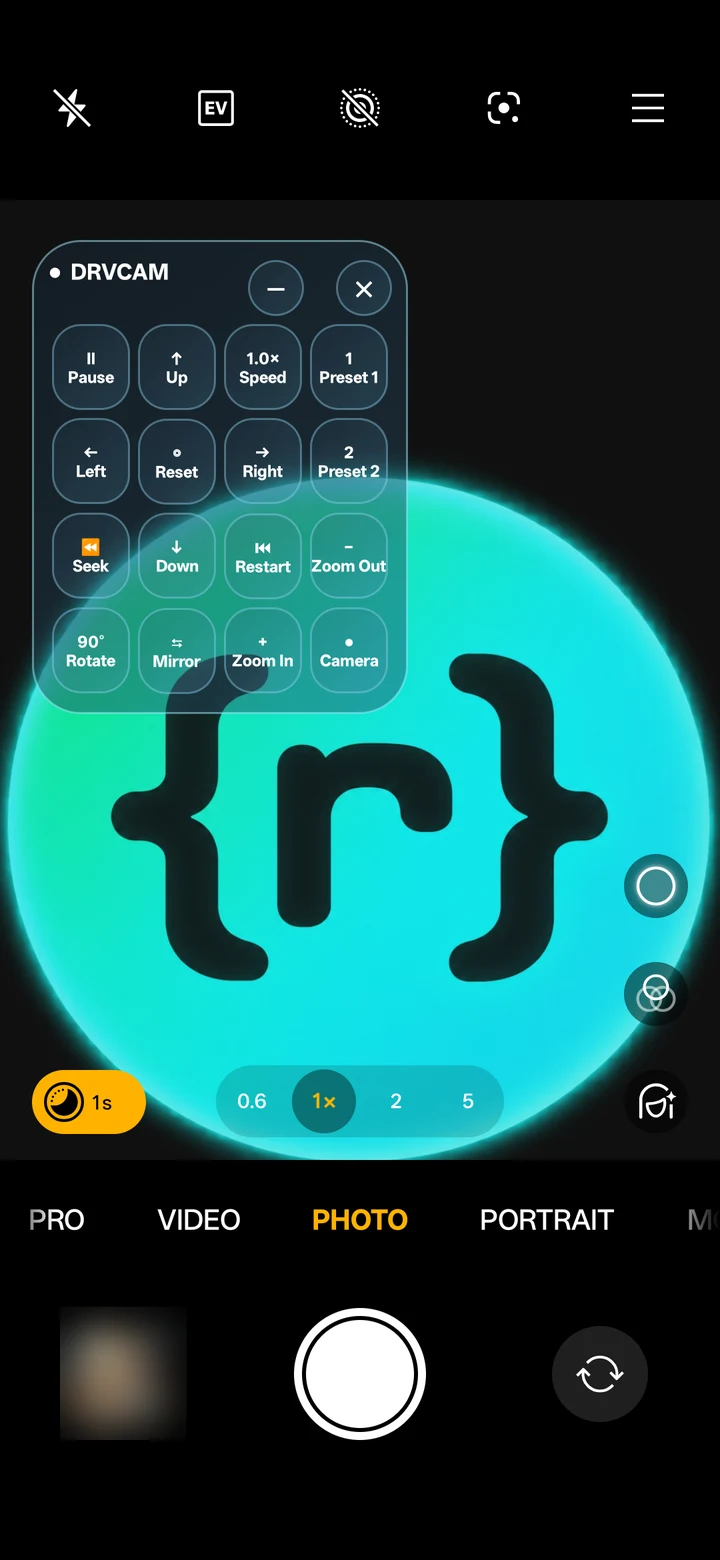
Each scene remembers its source, speed, loop, pan, zoom, rotation, mirror and framing. Switch in one tap.
Jump to the real camera and back while your media and targets stay set up.
Loop or play once, 0.5× to 2× speed, seek and restart.
Camera fill plus 4:3, 16:9, 9:16 and 1:1, without touching the original file.
Select several target apps and send each one the live state.
DRVCAM changes the picture only. Audio still comes from your real microphone.
Once signed in, a valid device launches without waiting for the network.
English, Español, العربية, 简体中文 and বাংলা.
// REQUIREMENTS
If you already run a root manager and an Xposed framework, you are most of the way there.
$ getprop ro.build.version.release
  9 … 16            ✓ supported
$ su -v
  Magisk | KernelSU | APatch ✓
$ xposed --status
  framework active  ✓
$ drvcam --ready
  ready to enable ▌
// DOWNLOAD
Both builds are signed by DroidRooter and share one package, so pick the one that matches your Android version.
Alpha software: expect rough edges. Message us on Telegram and we will send the signed build for your Android version, with its checksum and release notes.
// PRICING
Every paid plan includes every DRVCAM feature. Choose how many devices need access, then select a one-, three- or six-month period.
| Plan | 1 month | 3 months | 6 months | Choose plan |
|---|---|---|---|---|
| Core1 device | $30$30/month | $80$26.67/month | $140$23.33/month | Choose Core |
| Plus3 devices | $60$60/month | $160$53.33/month | $300$50/month | Choose Plus |
| Pro5 devices | $90$90/month | $250$83.33/month | $460$76.67/month | Choose Pro |
| Max10 devices | $150$150/month | $420$140/month | $750$125/month | Choose Max |
| Ultra50 devices | $500$500/month | $1,300$433.33/month | $2,000$333.33/month | Choose Ultra |
Trial access may be requested to check your phone and target apps. Availability and duration are confirmed case by case.
Buy or ask a question: Telegram · WhatsApp · contact@droidrooter.com
// FAQ
No. DRVCAM needs a rooted phone with Magisk, KernelSU or APatch and an active Xposed framework. The app opens without root, but the virtual camera stays off.
Android 9 through Android 16. Download the Android 9–11 build for older phones and the Android 12–16 build for newer ones.
Yes. When a supported app records, streams, takes a photo or runs a video call, its camera sees your DRVCAM source. Results can differ between apps, phones and camera modes, so test the exact setup you intend to use.
Choose by the number of devices that need DRVCAM access: Core for 1, Plus for 3, Pro for 5, Max for 10 or Ultra for 50 devices. Every paid plan includes every DRVCAM feature; only the device allowance and access period change.
Yes. Every paid plan includes the same DRVCAM features, including Main and preset sources, framing controls, playback controls, the floating controller and the virtual-to-physical camera switch.
Yes. You may request trial access through Telegram, WhatsApp or email so you can check your phone and target apps. Trial availability and duration are confirmed case by case and are not guaranteed.
No. DRVCAM only replaces the picture. Your real microphone keeps recording as normal.
Yes. Camera Source switches between your virtual media and the physical camera, and your media and targets stay set up. Some apps need their camera reopened before the switch shows.
No. Importing adds it to your Library. Tap Use to put it on Main, or save it to a preset, so nothing changes by accident.
After you sign in once, a device with valid access opens without waiting for the network. Signing in, renewing and first-time setup need an internet connection.
Choose the device allowance and access period you need, then message us on Telegram or WhatsApp, or email contact@droidrooter.com. We will confirm the plan and setup steps with you.
DRVCAM is a tool. You are solely responsible for how you use it, and DroidRooter is not responsible for any illegal use.